Claude Skills Tutorial: Build Reusable Agent Skills
Build reusable Claude Agent Skills with SKILL.md, scripts, references, invocation controls, and practical examples for Claude and Claude Code.
Part of the Coding Tools and Claude topic hubs.

Table of Contents
In the Matrix, there’s a scene where Morpheus is loading training programs into Neo’s brain and he wakes up from it and says, “I know Kung Fu.”
That’s basically what Claude skills are.
They’re a set of instructions that teach Claude how to do a certain thing. You explain it once in a document, like a training manual, and hand that to Claude. The next time you ask Claude to do that thing, it reaches for this document, reads the instructions, and does the thing.
You never need to explain yourself twice.
In this article, I’ll go over everything Claude Skills related, how it works, where to use it, and even how to build one yourself.
Updated for July 2026: Skills now work across Claude.ai, Claude Code, the Claude API, and the Agent SDK. In Claude Code, custom slash commands have been folded into Skills, so one
SKILL.mdcan be invoked directly with/skill-nameor loaded automatically when Claude decides it is relevant.
This is the hands-on guide for creating and testing an individual Skill. If you need organization-wide distribution, governance, access control, and lifecycle management, use my separate Claude Agent Skills deployment guide for teams.
Skills are also the workflow layer behind Jarvis, my personal AI assistant: the system keeps state in files, while each Skill teaches the agent how to handle one repeatable job.
For a complete production example, see how I automated my email newsletter with a Claude Code Skill, including API access, approval checkpoints, and scheduling.
Got Skills?
A Skill is a self-contained package of instructions, optional scripts, and reference files that Claude can load for a specialized task. The format follows the open Agent Skills standard, so the useful idea is bigger than one app: put the workflow in a predictable folder and let an agent discover only the parts it needs.
In effect, a Skill teaches Claude how to handle a particular workflow or domain with expert proficiency, on demand. For example, Anthropic’s built-in Skills enable Claude to generate Excel spreadsheets with formulas, create formatted Word documents, build PowerPoint presentations, or fill PDF forms, all tasks that go beyond Claude’s base training.
Skills essentially act as on-demand experts that Claude calls upon when a request matches the Skill’s description. You can also invoke a user-facing Skill yourself by typing its slash command.
Where you install a Skill determines who can use it:
| Location | Best for | Path or setup |
|---|---|---|
| Claude.ai | Personal knowledge-work workflows | Customize > Skills |
| Personal Claude Code Skill | Your workflow across every repository | ~/.claude/skills/<skill-name>/SKILL.md |
| Project Skill | Team workflow committed with the code | .claude/skills/<skill-name>/SKILL.md |
| Plugin Skill | A distributable Claude Code extension | A plugin’s skills/ directory |
| Enterprise Skill | Centrally managed company standards | Provisioned by an administrator |
Teach Me Sensei
At minimum, a Skill is a folder containing a primary file named SKILL.md (along with any supplementary files or scripts). This primary file contains the Skill’s name and description.
This is followed by a Markdown body containing the detailed instructions, examples, or workflow guidance for that Skill. The Skill folder can also include additional Markdown files (reference material, templates, examples, etc.) and code scripts (e.g. Python or JavaScript) that the Skill uses.
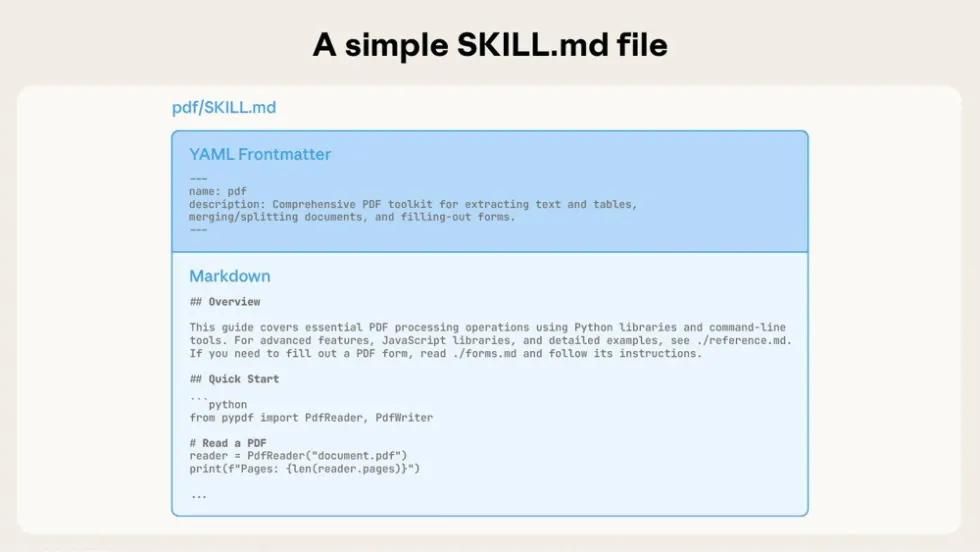
The technical magic happens through something called “progressive disclosure” (which sounds like a therapy technique but is actually good context engineering).
At startup, Claude scans every skill’s metadata for the name and description. So in context it knows that there’s a PDF skill that can extract text.
When you’re chatting with Claude and you ask it to analyze a PDF document, it realizes it needs the PDF skill and reads the rest of the primary file. And if you uploaded any supplementary material, Claude decides which ones it needs and loads only that into context.
So this way, a Skill can encapsulate a large amount of knowledge or code without overwhelming the context window. And if multiple Skills seem relevant, Claude can load and compose several Skills together in one session.
Code Execution
One powerful aspect of Skills is that they can include executable code as part of their toolkit. Within a Skill folder, you can provide scripts (Python, Node.js, Bash, etc.) that Claude may run to perform deterministic operations or heavy computation.
For example, Anthropic’s PDF Skill comes with a Python script that can parse a PDF and extract form field data. When Claude uses that Skill to fill out a PDF, it will choose to execute the Python helper script (via the sandboxed code tool) rather than attempting to parse the PDF purely in-token.
The execution environment depends on where you use the Skill. Claude.ai runs code in its code-execution environment. Claude Code runs permitted tools on your machine or remote environment. That distinction matters: a Skill is not automatically safe because it has a SKILL.md file.
Wait But Why?

If you’ve used Claude and Claude Code a lot, you may be thinking that you’ve already come across similar features. So let’s clear up the confusion, because Claude’s ecosystem is starting to look like the MCU. Lots of cool characters but not clear how they all fit together.
Skills vs Projects
In Claude, Projects are bounded workspaces where context accumulates. When you create a project, you can set project level instructions, like “always use the following brand guidelines”. You can also upload documents to the project.
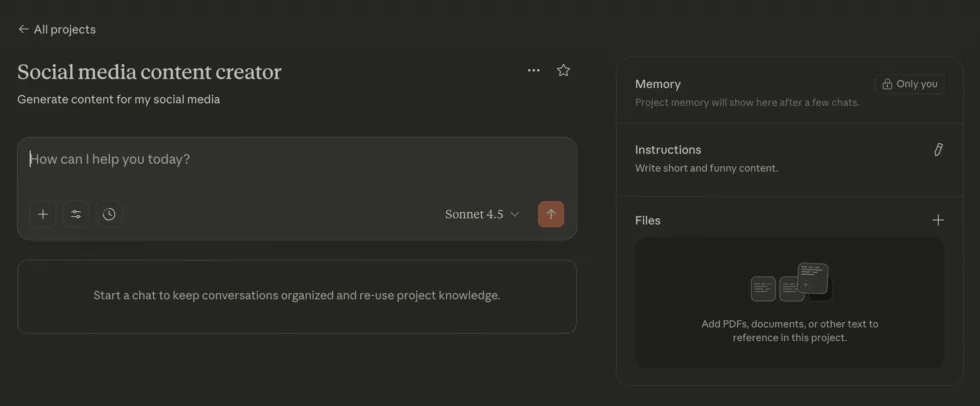
Now every time you start a new chat in that project, all those instructions and documents are loaded in for context. Over time Claude even remembers past conversations in that Project.
So, yes, it does sound like Skills because within the scope of a Project you don’t need to repeat instructions.
The main difference though is that Skills work everywhere. Create it once, and use it in any conversation, any project, or any chat. And with progressive disclosure, it only uses context when needed. You can also string multiple Skills together.
In short, use Projects for broad behavior customization and persistent context, and use Skills for packaging repeatable workflows and know-how. Project instructions won’t involve coding or file management, whereas Skills require a bit of engineering to build and are much more powerful for automating work.
Skills vs MCP
If you’re not already familiar with Model Context Protocol, it’s just a way for Claude to connect with external data and APIs in a secure manner.
So if you wanted Claude to be able to write to your Wordpress blog, you can set up a Wordpress MCP and now Claude can push content to it.
Again, this might sound like a Skill but the difference here is that Skills are instructions that tell Claude how to do tasks, while MCP is what allows Claude to take the action. They’re complementary.
You can even use them together, along with Projects!
Let’s say you have a Project for writing blog content where you have guidelines on how to write. You start a chat with a new topic you want to write about and Claude writes it following your instructions.
When the post is ready, you can use a skill to extract SEO metadata, as well as turn the content into tweets. Finally, use MCPs to push this content to your blog and various.
Skills vs Slash Commands (Claude Code Only)
This distinction no longer exists in the way it did when I first wrote this guide. Anthropic merged custom slash commands into Skills. Files in the old .claude/commands/ directory still work for compatibility, but Skills are now the recommended format.
A Skill can support both invocation styles:
-
Type
/team-reportto run it explicitly. -
Ask for a weekly update normally and let Claude load it when the Skill description matches.
That gives you the convenience of a command plus the progressive disclosure, scripts, resources, and sharing model of a Skill.
Skills vs Subagents (Also Claude Code Only)
Sub-agents in Claude Code refer to specialized AI agent instances that can be spawned to help the main Claude agent with specific sub-tasks. They have their own context window and operate independently.
A sub-agent is essentially another AI persona/model instance running in parallel or on-demand, whereas a Skill is not a separate AI. It’s more like an add-on for the main Claude.
So while a Skill can greatly expand what the single Claude instance can do, it doesn’t provide the parallel processing or context isolation benefits that sub-agents do.
You already have skills
It turns out you’ve been using Skills without realizing it. Anthropic built four core document skills:
-
DOCX: Word documents with tracked changes, comments, formatting preservation
-
PPTX: PowerPoint presentations with layouts, templates, charts
-
XLSX: Excel spreadsheets with formulas, data analysis, visualization
-
PDF: PDF creation, text extraction, form filling, document merging
These skills contain highly optimized instructions, reference libraries, and code that runs outside Claude’s context window. They’re why Claude can now generate a 50-slide presentation without gasping for context tokens like it’s running a marathon.
These are available to everyone automatically. You don’t need to enable them. Just ask Claude to create a document, and the relevant skill activates.
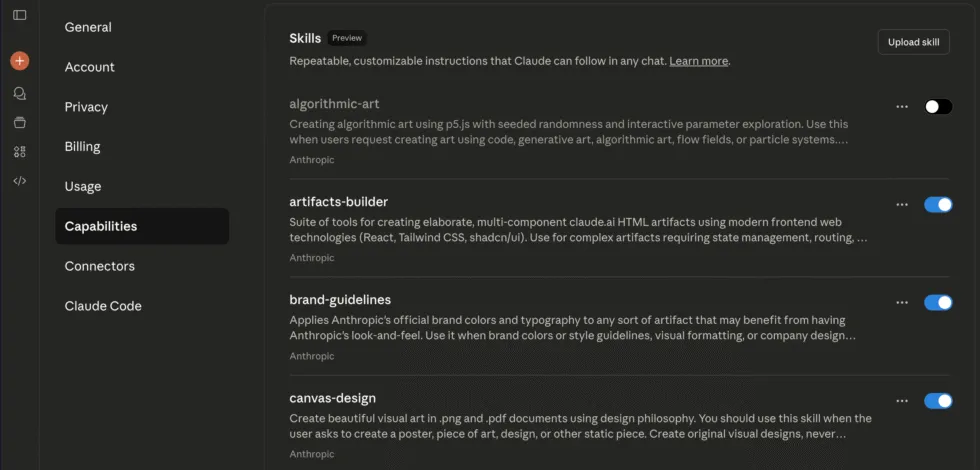
Additionally, Anthropic has published more Skills that you can inspect and learn from. In Claude.ai, open Customize > Skills to enable available Skills, create one, or upload your own.
How To Build Your Own Skill
Of course the real value of skills comes from building your own, something that suits the work you do. Fortunately, it’s not too hard. There’s even a pre-built skill you may have noticed in the screen above that builds skills.
But let’s walk through it manually so you understand what’s happening. On your computer, create a folder called team-report. Inside, create a file called SKILL.md:
---
name: team-report
description: Creates standardized weekly team updates. Use when the user wants a team status report or weekly update.
argument-hint: "[notes or reporting period]"
---

# Weekly Team Update Skill

## Instructions

When creating a weekly team update, follow this structure:

1. **Wins This Week**: 3-5 bullet points of accomplishments
2. **Challenges**: 2-3 current blockers or concerns
3. **Next Week's Focus**: 3 key priorities
4. **Requests**: What the team needs from others

## Tone
- Professional but conversational
- Specific with metrics where possible
- Solution-oriented on challenges

## Example Output

**Wins This Week:**
- Shipped authentication refactor (reduced login time 40%)
- Onboarded 2 new engineers successfully
- Fixed 15 critical bugs from backlog

**Challenges:**
- Database migration taking longer than expected
- Need clearer specs on project X

**Next Week's Focus:**
- Complete migration
- Start project Y implementation
- Team planning for Q4

**Requests:**
- Design review for project Y by Wednesday
- Budget approval for additional testing tools
That’s it. That’s the core Skill.
For Claude.ai, zip the team-report folder and go to Customize > Skills, then choose + Create skill > Upload.
For Claude Code, put the folder in one of these locations:
# Personal: available in every project
~/.claude/skills/team-report/SKILL.md

# Project: shared with the repository
.claude/skills/team-report/SKILL.md
Claude Code detects Skill changes while it is running, so you can edit the file and test it again without restarting. Type /team-report to invoke it directly, or ask for a weekly update and let Claude select it automatically.
Control How Claude Code Invokes a Skill
The frontmatter can do more than name and describe the Skill. These are the controls I reach for most:
---
name: deploy-preview
description: Builds and deploys a preview environment, then verifies the public URL.
argument-hint: "[branch name]"
disable-model-invocation: true
allowed-tools: Bash(npm:*), Bash(git status:*), Read
----
disable-model-invocation: truemakes the Skill manual-only. This is useful for deployments and other consequential actions. -
user-invocable: falsehides an internal Skill from the slash-command menu while still allowing Claude to load it. -
allowed-toolsgrants only the listed tools while the Skill is active. -
context: forkruns the Skill in an isolated subagent context. Addagent,model, oreffortwhen that workflow needs a particular execution profile.
You can also add paths, hooks, and shell configuration for more advanced workflows. Keep the basic Skill simple first, then add controls only when the workflow needs them.
Leveling Up: Adding Scripts and Resources
For more complex skills, you can add executable code. Let’s say you want a skill that validates data:
data-validator-skill/
├── SKILL.md
├── schemas/
│   └── customer-schema.json
└── scripts/
    └── validate.py
Your SKILL.md references the validation script. When Claude needs to validate data, it runs validate.py with the user’s data. The script executes outside the context window. Only the output (“Validation passed” or “3 errors found”) uses context.
Best Practices
1. Description is Everything
Bad description: “Processes documents”
Good description: “Extracts text and tables from PDF files. Use when working with PDF documents or when user mentions PDFs, forms, or document extraction.”
Claude uses the description to decide when to invoke your skill. Be specific about what it does and when to use it.
2. Show, Don’t Just Tell
Include concrete examples in your skill. Show Claude what success looks like:
## Example Input
"Create a Q3 business review presentation"

## Example Output
A 15-slide PowerPoint with:
- Executive summary (slides 1-2)
- Key metrics dashboard (slide 3)
- Performance by segment (slides 4-7)
- Challenges and opportunities (slides 8-10)
- Q4 roadmap (slides 11-13)
- Appendix with detailed data (slides 14-15)
3. Split When It Gets Unwieldy
If your SKILL.md starts getting too long, split it:
financial-modeling-skill/
├── SKILL.md              # Core instructions
├── DCF-MODELS.md         # Detailed DCF methodology
├── VALIDATION-RULES.md   # Validation frameworks
└── examples/
    └── sample-model.xlsx
4. Test With Variations
Don’t just test your skill once. Try:
-
Different phrasings of the same request
-
Edge cases
-
Combinations with other skills
-
Both explicit mentions and implicit triggers
Security (do not ignore this)
We’re going to see an explosion of AI gurus touting their Skill directory and asking you to comment “Skill” to get access.
The problem is Skills can execute code, and if you don’t know what this code does, you may be in for a nasty surprise. A malicious skill could:
-
Execute harmful commands
-
Exfiltrate your data
-
Misuse file operations
-
Access sensitive information
-
Make unauthorized API calls (in environments with network access)
Anthropic’s guidelines are clear: Only use skills from trusted sources. This means:
-
You created it (and remember creating it)
-
Anthropic created it (official skills)
-
You thoroughly audited it (read every line, understand every script)
So if you found it on GitHub or some influencer recommended it, stay away. At the very least, be skeptical and:
-
Read the entire SKILL.md file
-
Check all scripts for suspicious operations
-
Look for external URL fetches (big red flag)
-
Verify tool permissions requested
-
Check for unexpected network calls
Treat skills like browser extensions or npm packages: convenient when trustworthy, catastrophic when compromised.
In Claude Code, use allowed-tools to narrow what a Skill can do, but do not confuse a tool allowlist with a complete security boundary. Review the instructions, scripts, hooks, dependencies, and any network access before installing a third-party Skill.
Use Cases and Inspiration
The best Skills are focused on solving a specific, repeatable task that you do in your daily life or work. This is different for everyone. So ask yourself: What do I want Claude to do better or automatically?
I’ll give you a few examples from my work to inspire you.
Meeting Notes and Proposals
We all have our AI notetakers and they each give us summaries and transcripts that we don’t read. What matters to me is taking our conversation and extracting the client’s needs and requirements, and then turning that into a project proposal.
Without Skills, I would have to upload the transcript to Claude and give it the same instructions every time to extract the biggest pain points, turn it into a proposal, and so on.
With Skills, I can define that once, describing exactly how I want it, and upload that to Claude as my meeting analyzer skill. From now on, all I have to do is tell Claude to “analyze this meeting” and it uses the Skill to do it.
Report Generator
When I run AI audits for clients, I often hear people say that creating reports is very time consuming. Every week they have to gather data from a bunch of source sand then format it into a consistent report structure with graphs and summaries and so on.
Now with Claude skills they can define that precisely, even adding scripts to generate graphs and presentation slides. All they have to do is dump the data into a chat and have it generate a report using the skill.
Code Review
If you’re a Claude Code user, building a custom code review Skill might be worth your time. My old code-review slash command can now be a project Skill with scripts, scoped tool access, direct invocation, and automatic discovery.
Content Marketing
I’ve alluded to this earlier in the post but there are plenty areas where I repeat instructions to Claude while co-creating content, and Skills allows me to abstract and automate that away. One example is my Jev Editor skill, which checks a draft for AI tells, voice, editing, and SEO before I publish. I walk through how it works in my guide to Jev.
Podcast Knowledge Base
We recently built 86 downloadable skills from Lenny Rachitsky’s podcast, extracting insights from 297 episodes. Each skill teaches Claude how to think like the best product minds: prioritize like Shreyas Doshi, tell stories like April Dunford, or lead like Brian Chesky. It’s a great example of how Skills can package expert knowledge for reuse.
Practical Next Steps
If you made it this far (seriously, thanks for reading 3,000 words about AI file management), here’s what to do:
Immediate Actions:
-
Enable Skills: In Claude.ai, go to Customize > Skills
-
Try Built-In Skills: Ask Claude to create a PowerPoint or Excel file
-
Identify One Pattern: What do you ask Claude to do repeatedly?
-
Create Your First Skill: Upload the team report example to Claude.ai or place it in
.claude/skills/for Claude Code -
Test and Iterate: Use it 5 times, refine based on results
If you thought MCP was big, I think Skills have the potential to be bigger. If you need help with building more Skills, subscribe below and reach out to me.
Related Posts

AI Killed The CMS: How I Ditched Mine for Code and Markdown
I ditched WordPress for Astro + Markdown. Now my blog is code, deployments are instant, and I've completely transformed my content creation process.

The Anatomy of Claude Code And How To Build Agent Harnesses
See how Claude Code's agent loop handles prompts, tools, context, and verification, and apply the same design to your own agent harness.

Build an MCP Server: Step-by-Step Python Tutorial
Stop using other people's MCP servers and build your own. A step-by-step Python tutorial that takes you from zero to a working MCP server in under 30 minutes.